In the rapidly evolving landscape of smart buildings and energy-efficient infrastructure, lighting is no longer just about illumination; it is about intelligence, data, and adaptability. In recent years, the demand for powerful, interoperable, and future-proof lighting solutions has surged to unprecedented levels.
We will dissect the core components, compare DALI against legacy protocols, and provide actionable insights into commissioning and troubleshooting.
Table of Contents
What is a DALI Lighting Control System?
At its core, a DALI lighting control system is a dedicated digital protocol for lighting control that allows for two-way communication between devices. Unlike traditional analog systems, DALI (Digital Addressable Lighting Interface) is an international standard (IEC 62386) that ensures interoperability between components from different manufacturers.
This means a DALI driver from Manufacturer A can seamlessly communicate with a sensor from Manufacturer B and a controller from Manufacturer C, provided they are certified. This vendor neutrality breaks down proprietary silos, giving specifiers the freedom to choose the best-in-class components for any project.
Key Components of a Modern DALI Network
Building a reliable DALI Lighting Control System requires understanding the specific DALI components that make up the ecosystem. A typical network is deceptively simple in its wiring but sophisticated in its logic.
1. DALI Control Gear (Drivers):
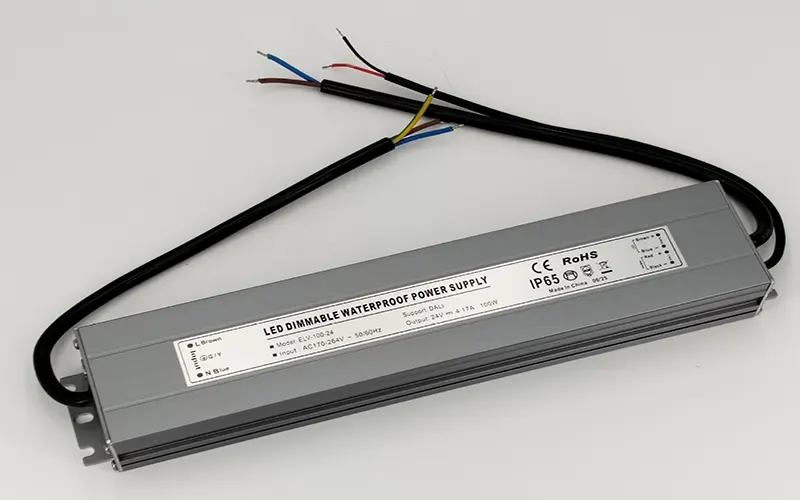
The heart of the system is the LED driver equipped with a DALI interface. These are categorized by “Device Types” (DT). For example, DT6 is for standard single-color dimming, while DT8 is essential for tunable white or RGB color-changing applications.
2. Input Devices (Sensors and Switches):
A truly automated system relies on input devices. Occupancy sensors detect presence to switch lights on and off, while light level sensors (photocells) harvest daylight to dim artificial light automatically, maximizing energy savings. Push-button panels allow users to manually trigger scenes. In a DALI network, these inputs are not hard-wired to specific lights; instead, they send digital commands that can be logically mapped to any group of lights during commissioning.
3. Controllers and Gateways:
For standalone rooms, a simple application controller may suffice. However, for whole-building management, DALI gateways are crucial. These devices bridge the DALI bus to higher-level building management systems (BMS) using protocols like BACnet, KNX, or Modbus.
4. Power Supply:
The DALI bus requires a dedicated extra-low voltage power supply (typically 16V DC). It is vital to calculate the total current consumption of all devices on the loop to ensure the power supply is not overloaded.
5. Step-by-Step: Commissioning and Programming Your DALI System
Commissioning is where the physical installation transforms into a functional intelligent system. Unlike analog systems where functionality is determined by wiring, DALI dimming logic is defined entirely in software. This offers immense flexibility but requires a structured approach.
Step 1: Physical Verification
Before connecting the commissioning tool, verify the DALI wiring. Ensure the polarity is correct (though DALI is non-polarized, consistency helps troubleshooting), check for short circuits between the DALI lines and mains voltage, and confirm the bus voltage is within the 12V–22V range.
Step 2: Connection and Scanning
Connect your PC or handheld commissioning tool to the DALI bus. Launch the commissioning software and initiate a “Scan.” The software will detect all connected devices and assign them temporary random addresses.
Step 3: Addressing and Grouping
Assign permanent short addresses (0–63) to each device. Once addressed, organize your fixtures into logical groups. For instance, all lights near a window might be “Group 1” for daylight harvesting, while lights in a conference room form “Group 2.” You can also create “scenes,” which are preset brightness levels for different activities (e.g., “Presentation Mode” at 80%, “Cleaning Mode” at 100%).
Step 4: Sensor Configuration
Configure the input devices. Set the time delays for occupancy sensors, define the target lux levels for daylight sensors, and map push-buttons to specific scenes or groups. This logical mapping is the true power of DALI; if the office layout changes, you can reprogram the logic without touching a single wire.
Step 5. Testing and Handover
Run through every scene and sensor trigger to ensure the system responds correctly. Document the addressing table and group configurations for future facility management. Proper commissioning ensures the DALI lighting control system performs optimally from day one.
DALI vs Other Lighting Control Systems (0-10V & DMX)
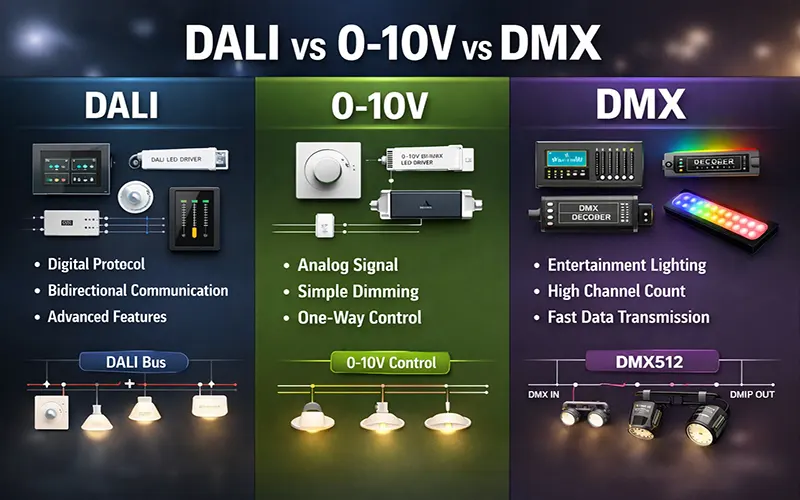
When choosing a protocol, it’s important to look at DALI vs 0-10V and DMX.
DALI vs 0-10V: 0-10V is an analog system where the voltage level determines brightness. It requires a separate wire run for every “zone” of lights. In contrast, DALI wiring allows all lights to be on one cable, with zoning handled by software. DALI also provides feedback (e.g., “Lamp 4 is broken”), which 0-10V cannot do.
DALI vs DMX: DMX is high-speed and primarily used for theatrical lighting or complex RGB color-changing effects. While DALI can handle color (DT8), it is slower and optimized for architectural lighting and energy management rather than rapid light shows.
Feature | DALI | 0-10V | DMX |
Signal | Digital (Two-Way) | Analog (One-Way) | Digital (One-Way) |
Zoning | Software-defined | Physical Wiring | Software-defined |
Addressing | Individual (63 per bus) | Not possible | High density (512 per universe) |
DALI System Commissioning and Troubleshooting
Common Wiring Issues:
One of the most frequent problems is the accidental mixing of DALI control cables with high-voltage mains cables in the same conduit without proper separation, leading to electromagnetic interference (EMI). Always maintain separation or use shielded cables.
Troubleshooting Steps:
Check Voltage: Measure the voltage between the two DALI wires. It should be between 12V and 22V DC. If it is near 0V, there may be a short circuit. If it is too high, the power supply might be faulty or mismatched.
Isolate Devices: If the bus is down, disconnect devices in halves to isolate the faulty unit. A single defective driver can sometimes drag down the entire bus voltage.
Address Conflicts: Ensure no two devices have the same short address. While commissioning software usually prevents this, manual errors can occur.
Polarity Check: Although DALI is non-polarized, some specific proprietary accessories or older devices might behave erratically if polarity is inconsistent across a large network. Standardize your wiring color code (e.g., White/Black or Red/Black) throughout the project.
By methodically checking the physical layer before blaming the software, most DALI Lighting Control System issues can be resolved efficiently, ensuring minimal downtime during the handover phase.
Is DALI the Right Lighting Control System for You?
Deciding on a DALI Lighting Control System usually depends on the scale and flexibility required for your project.
It is the right choice if:
You are managing a commercial office, hospital, or school where energy codes are strict.
You need “Daylight Harvesting” (auto-dimming based on sunlight).
You want to reduce long-term maintenance costs through remote monitoring.
You anticipate that the room layouts might change in the future (no rewiring needed!).
However, for a single-room residential renovation with only two dimming zones, a simpler phase-cut or 0-10V system might be more cost-effective.
Conclusion
The DALI lighting control system represents flexible, intelligent building lighting. Its combination of DALI dimming precision, robust DALI wiring simplicity, and intelligent data capabilities makes it the most future-proof investment for modern lighting infrastructure. By adopting DALI, you are not just installing lights; you are deploying a smart, responsive, and efficient asset that will serve the building for decades.
👉 Contact us today to learn more about our DALI product series and find the right solution for your project.
FAQs
Can DALI be controlled wirelessly?
Absolutely. With the introduction of DALI+, the protocol now supports “DALI over Wireless” (such as Thread or Bluetooth Mesh). This allows you to maintain the DALI software structure and addressing while eliminating the need for physical DALI wiring between certain zones or floors.
Why is my DALI light not responding to commands?
This is often due to one of three things:Bus Power: Check if the DALI bus voltage is around 16V DC.Addressing Conflict: Two devices may accidentally share the same address.Wiring Length: If the cable exceeds 300m, the signal may be too weak for the driver to “read” the digital command.
Does a DALI system require special maintenance?
No special maintenance is required. In fact, DALI systems are easier to maintain because they provide fault feedback, allowing quick identification and replacement of faulty devices.
What is the difference between DALI-1 and DALI-2?
DALI-1 was the original version of the protocol, and while many legacy devices remain compatible, DALI-2 is the current standard as of 2026. The biggest improvement lies in reliability and interoperability—DALI-2 requires strict third-party certification, whereas DALI-1 devices were mostly self-certified. In addition, DALI-2 standardizes input devices such as sensors, switches, and occupancy detectors, which were previously proprietary and less consistent across manufacturers.
DALI-2 also introduces advanced features like color control (DT8), emergency lighting testing, and improved diagnostic capabilities. For any new project, it is strongly recommended to specify DALI-2 to ensure better system compatibility, enhanced functionality, and long-term future-proofing.
Does a DALI system require special maintenance?
No special maintenance is required. In fact, DALI systems are easier to maintain because they provide fault feedback, allowing quick identification and replacement of faulty devices.